10-Minute Email Alternative: Why a Flexible Temporary Inbox Works Better
You want to download an ebook, test a new tool, compare prices on a marketplace, or sign up for a service you don’t wish to use again. The website asks for your email address. But you don’t want promotional messages filling your personal inbox afterward.
A 10-minute email address can solve that problem, but the short validity period isn't always enough because verification emails may arrive late, sign-up processes can take longer than expected, and an interruption could leave you with an expired inbox before you've finished.
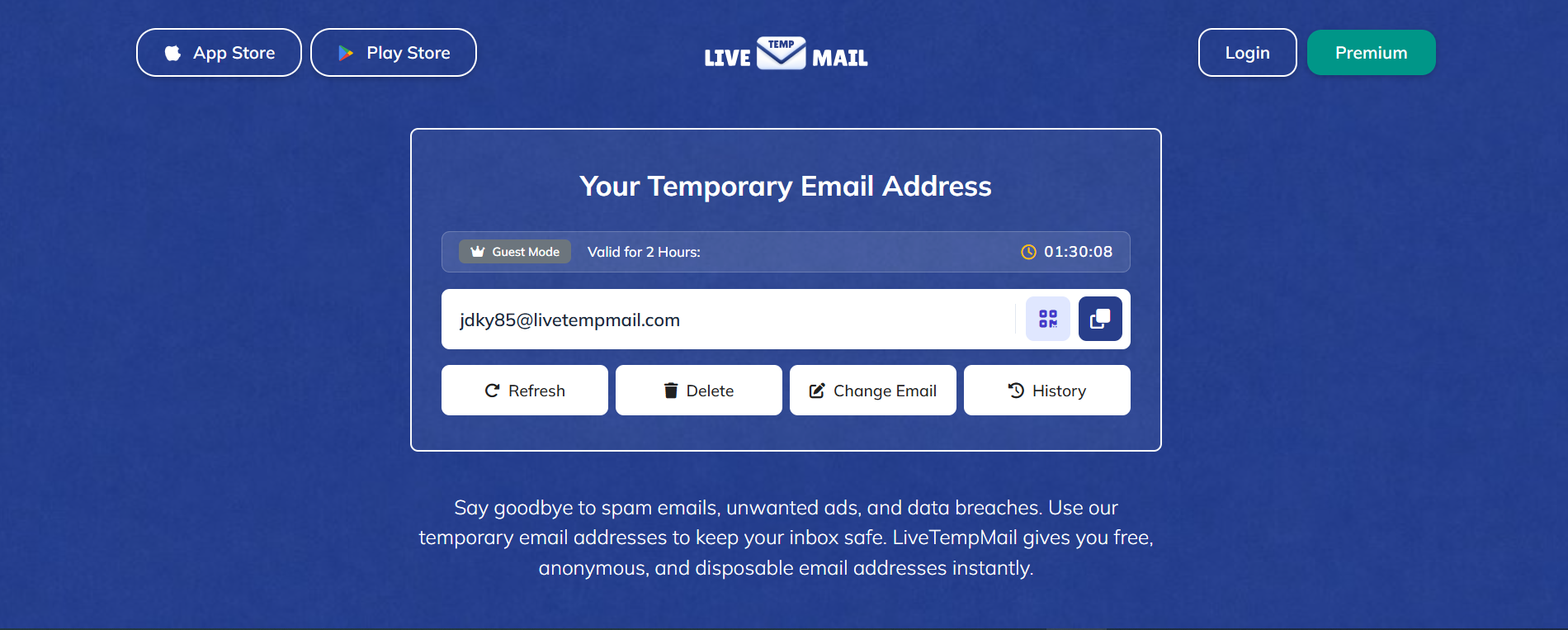
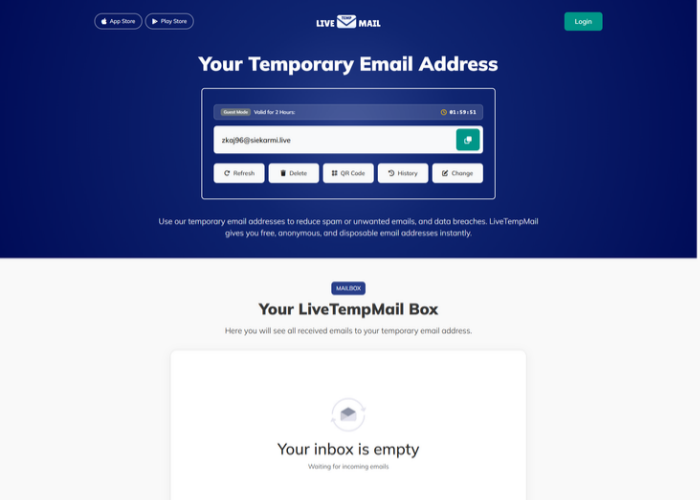
That's where a longer-lasting temporary inbox could help. LiveTempMail provides guest users with a temporary email address valid for 2 hours, giving them more time to receive messages and complete short-term signups.
Why People Search for a 10-Minute Email Alternative
Most users don't start with a deep technical interest in temporary email; they start with a practical problem.
They want to perform an online task without turning their personal inbox into a target for persistent marketing.
This could include:
- Signing up for a trial
- Accessing a coupon or promo code
- Downloading a free resource
- Testing a website or app
- Joining a forum for a one-time visit
- Comparing services before making a commitment
- Keeping your main inbox free from clutter
- Avoiding spam from unknown websites
The initial appeal of "10-minute inboxes" lay in their simplicity. You receive a random email address, wait for an incoming message, copy a code or click a link, and then proceed with your task. However, a fixed 10-minute window doesn't suit every sign-up process.
The sign-up (registration) process can be lengthy: some websites require multiple authentication steps, while others take longer than expected to send verification emails. Many services still send important communications, onboarding links, password setup instructions, or account approval notifications well after the initial ten minutes. In other words, even if the need is temporary, this process isn't always instantaneous.
People looking for a 10-minute email alternative often need more time to receive verification messages, finish signups, or return to their inbox after an interruption.
The Core Problem With Fixed 10-Minute Inboxes
You sign up for a platform, and the verification email doesn't arrive immediately. Maybe the website is slow. Maybe its mail server is delayed. Maybe the message arrives after eight minutes, and you still have to create a password, complete a profile, and confirm a second email. Suddenly, your temporary inbox becomes a race against the clock.
That is not just inconvenient. It defeats the purpose. A disposable email service should reduce friction, not add more of it. Here are the most common frustrations users face with rigid, short-expiry inboxes:
1. Delayed verification emails
Not every system sends instantly. Some platforms process signups in batches. Others route mail through third-party providers that introduce delays. When timing is tight, even a small delay can make the inbox useless.
2. Interrupted signup flows
People browse while multitasking. They switch tabs, answer messages, take calls, and compare options. A tool that assumes everyone can complete everything in ten uninterrupted minutes is built for an ideal scenario, not how people actually behave.
3. Multi-step onboarding
Many websites now require multiple interactions. You verify your email, set a password, confirm a preference, and maybe even wait for manual approval. A short-lived inbox may work for the first message but fail for the rest.
4. No room for retries
If a code fails or a page refreshes, users may need the email once more. With a strict 10-minute limit, there is little room to recover from errors.
5. Poor fit for testing workflows
Developers, QA teams, and product testers often need to verify the same flows multiple times: password resets, onboarding emails, authentication steps, and transactional messages. For such tasks, a ten-minute window is often far too short.
What Makes a Good 10-Minute Email Alternative?
A strong alternative is not defined merely by offering a duration of "more than ten minutes." While that is helpful, the best temporary email tools are designed with ease of use, privacy, and real-world scenarios in mind.
Here are some features that matter most.
Instant email generation
Nobody wants extra steps. A good service should generate an address immediately so the user can copy it and move on.
Fast inbox refresh
The inbox should update quickly when verification emails arrive. Delays inside the temp mail service itself create unnecessary uncertainty.
Adaptable usage window
A temporary email should stay available long enough for normal online behavior. Users should not feel pressured by an unrealistic countdown.
Easy readability
Messages should be simple to open, scan, and act on. Whether the email contains an OTP, a magic link, or a confirmation button, the user should be able to find it without friction.
Privacy-first design
The whole purpose of using a disposable address is to avoid exposing a primary mailbox. A good tool should allow users to receive emails without sharing their primary address or creating an unnecessary account.
Spam protection
Temporary email is not just about anonymity. It also keeps spam out of the inbox that matters most.
Practical reliability
This is an important point. The service should function when users need it, not just in theory. If it frequently fails during the standard sign-up process, it isn't a viable alternative.
10-Minute Email vs. Flexible Temporary Email
The fastest way to understand the difference is to compare the experiences side by side.
A longer-lasting inbox isn't always better. The ideal validity period depends on what you need to do. For a quick verification, ten minutes may be enough. For a multi-step signup or delayed confirmation email, a longer window can be more practical. The goal is to have enough time without keeping the address longer than necessary.
Real-Life Situations Where a Better Alternative Makes a Difference
A long-lasting temporary inbox may help when a website requires multiple authentication steps and sends follow-up messages. Here are some common situations where the extra time proves helpful.
Signing up for tools you are only evaluating
Maybe you are comparing project management tools, AI apps, browser extensions, or SaaS products. You do not want five companies sending weekly nurture campaigns to your main inbox just because you looked around.
A temporary inbox lets you explore freely.
Accessing one-time offers
Discount codes, gated downloads, webinar replays, and lead magnets often require an email. Some are useful. Many are not worth a permanent subscription to yet another list.
Joining communities or forums
Sometimes you want to read one thread, ask one question, or unlock one resource. That does not always justify opening the door to long-term email clutter.
Testing a product or form
If you build websites, apps, landing pages, or signup flows, temporary inboxes are incredibly useful. You can test confirmation emails, failed retries, magic links, and password resets without using your personal or company inbox.
Protecting your primary identity
Your email address is frequently linked to your name, occupation, purchasing behavior, and online history. Keeping it private in less-than-trustworthy situations is a sound digital precaution.
Avoiding “soft spam.”
Not all unwanted emails are obvious spam. Sometimes, they're a series of promotional reminders that gradually clutter your inbox. A temporary address keeps that slow drip out of your main inbox.
In these situations, a temporary mailbox with a longer validity period gives users more time to complete tasks without revealing their primary email address.
Why LiveTempMail Is a Practical 10-Minute Email Alternative
LiveTempMail offers guest users a temporary email address that remains valid for 2 hours. The address is generated automatically when the homepage loads, and users can copy it without creating an account.
The inbox includes a refresh option to look for incoming messages. In our October 17 test, a message sent to a generated address appeared in the inbox after 8 seconds.
The longer validity period gives users more time to complete signups or wait for delayed emails compared with a fixed 10-minute inbox. However, message delivery times can vary, and some websites may reject disposable email addresses.
Temporary Email Is Useful, But It Is Not for Everything
Temporary email is useful for short-term activities, but it is not suitable for accounts that require long-term access.
You should not rely on a temporary email for:
- Banking or payment accounts
- Medical portals
- Government services
- Legal communications
- Essential work accounts
- Long-term subscriptions you truly want to keep
- Accounts where future account recovery matters
Why? Because a temporary inbox is designed for short-term access, not permanent account management. A tool's value increases when users understand what it does well and where it shouldn't be used.
In other words, a temporary email is powerful when paired with good judgment. Use it where privacy and convenience matter. Do not use it where continuity, security, and account recovery are essential.
The Privacy Advantage Most People Underestimate
Many people think a temporary email is only for dodging spam. That is a big benefit, but it is not the only one.
Your email address has become a core identity signal online. It connects your purchases, subscriptions, logins, social profiles, and often your real name.
It limits your data footprint
When you use a temporary address for a low-trust or one-time interaction, your primary email stays out of yet another database.
It reduces profiling opportunities
Some companies build rich profiles based on contact information and multiple interactions. Keeping exploratory signups separate can help reduce that tracking.
It protects your focus
Not every website deserves permanent access to your attention. Temporary email lets you decide which relationships move into your real inbox and which ones stay temporary.
Inbox overload is not just an annoyance. It affects concentration. Important emails get buried. Useful alerts become harder to spot. Temporary email acts like a filter before messages reach your main communication channel.
How Developers, QA Teams, and Product Testers Benefit
This topic is often written only for casual users, but it has a technical side, too.
In development and testing environments, a temporary email can be surprisingly valuable.
Imagine you are working on:
- Account creation flows
- Password reset emails
- Welcome sequences
- Double opt-in confirmation
- Transactional email testing
- User onboarding paths
- Referral invite systems
Using a personal inbox for all of that gets messy fast. Temporary email helps teams isolate scenarios, reduce clutter, and run faster tests.
Here is where a flexible service beats a rigid 10-minute inbox once more.
Better for repeated testing
A team may need to trigger multiple emails for the same workflow. A short expiry can interrupt the process before the test is complete.
Easier debugging
If a confirmation email arrives late or fails once, testers may need to retry without losing the inbox.
Cleaner separation of environments
Temporary inboxes help separate staging, QA, and exploratory tests from real communication channels.
Common Mistakes People Make With Temporary Email
Temporary email can help keep unwanted messages out of your primary mailbox, but using it for the wrong purpose can create problems. Here are five common mistakes to avoid.
1. Using Temporary Email for Important Accounts
A temporary inbox is useful for free trials, one-time downloads, and short-term registrations. However, it's not ideal for banking, work accounts, or services you may need to access later.
Tip: If you might need to reset your password or recover an account in the future, use an email address you can access long-term.
2. Expecting Every Website to Accept Temporary Email
Not all websites handle disposable email addresses the same way. Some send verification messages immediately, while others take longer or block temporary email domains altogether.
Tip: Allow enough time for verification, and use a permanent email address when a service requires one. A longer-lasting inbox gives you more time to wait, but it doesn't guarantee delivery or acceptance.
3. Leaving Before Completing the Signup Process
Receiving the first verification email doesn't always mean your registration is complete. Some websites require additional confirmation steps or send follow-up messages.
Tip: Keep your temporary inbox open until you've completed the entire signup process. Look for any additional emails before the address expires.
4. Assuming Temporary Email Provides Complete Anonymity
Using a disposable address helps keep your personal inbox safe from unwanted emails, but it doesn't make you anonymous. Websites may still collect information related to you, such as your IP address and account activity.
Tip: Treat temporary email as one privacy tool, not a complete security or anonymity solution. Avoid sharing sensitive information through disposable inboxes.
5. Trusting Suspicious Websites Because You're Using Temp Mail
A temporary address can keep unwanted follow-up emails out of your main inbox, but it cannot protect you from every online threat. Dangerous links, fake downloads, and phishing pages can still put your information or device at risk.
Tip: Check whether a website is trustworthy before entering information or downloading files. Use temporary email for low-risk interactions, not as a reason to ignore basic online safety precautions.
We Tested a Temporary Inbox on LiveTempMail
To evaluate the actual experience of using a temporary email service, we tested the 'guest mode' of LiveTempMail. This test aimed to observe how a temporary address is generated, how long it takes to receive a test email, and what happens to the inbox after the 2-hour validity period expires.
Step 1: Generating a temporary email address
We opened the LiveTempMail homepage on March 14, 2026. The website automatically generated a random temporary email address.
We copied the address using the copy button. We did not need to register an account for this process.
Step 2: Sending a Test Email
We sent a test email from one of our email accounts to the temporary address.
The email subject was set to "Email Test," and the message contained simple test text.
We sent the email at 5:45:31 pm.
Step 3: Checking incoming email
After sending the email, we checked the LiveTempMail inbox.
The test message appeared in the inbox at 5:45:39 pm. The email was received in 8 seconds.
We opened the message and verified the sender, subject, and content.
Step 4: Checking the Expiration Timer
During testing, the validity period for a LiveTempMail guest inbox was 2 hours.
This provides a validity window 12 times longer than a traditional 10-minute inbox.
This extra time gives users more time to receive delayed verification emails or complete an interrupted signup process.
Step 5: Checking the Inbox After Expiration
After the 2-hour validity period ended, we checked the inbox behavior.
When the timer reached 00:00:00, LiveTempMail displayed the message "Your address is expired." A few seconds later, a new temporary email address was generated automatically, and the previously received test message was no longer visible in the active inbox.
Our Test Results
- Test date: March 14, 2026
- Address generated: 05:43:34 pm
- Email sent: 5:45:31 pm
- Email received: 5:45:39 pm
- Delivery time: 08 seconds
- Inbox validity: 2 hours
- Expiration behavior: The inbox expired after 2 hours, displayed an expiration message, and automatically generated a new address. The previous test message was no longer visible in the active inbox.
What We Learned
LiveTempMail’s 2-hour guest inbox gives users more time to receive messages than a 10-minute inbox. However, the time taken for an email to be delivered may vary depending on the sender's mail server as well as internet conditions.
We tested one email, which arrived in 8 seconds. Delivery times can vary, so this result shouldn't be treated as an average or a guarantee for other messages.
Frequently Asked Questions
What is a 10-minute email alternative?
A 10-minute email alternative is a temporary email service that works like a short-term, disposable inbox, helping protect your privacy and reduce spam while offering a more flexible experience. It helps users complete sign-ups and receive verification emails free from the pressure of a strict countdown, while also preventing inbox clutter.
Why do people look for alternatives to 10-minute email services?
Most people seek alternatives because a fixed 10-minute inbox might expire too quickly. Delays in receiving verification emails, multi-step onboarding processes, or interruptions during a browsing session often make a rigid countdown timer frustrating.
Is it safe to use a temporary email?
Temporary emails are generally safe for low-risk, short-term online interactions, such as free trials, accessing gated content (downloads), software testing, or one-time sign-ups. Depending on the provider, some disposable inboxes may be publicly accessible.
Is LiveTempMail a good option for avoiding spam?
Yes, LiveTempMail helps keep spam, marketing communications, and unsolicited follow-up emails out of your main inbox. It helps create a clear boundary between casual sign-ups and important personal or professional correspondence.
Can developers use a temporary email for testing purposes?
Absolutely. Developers, QA teams, and product testers often use temporary inboxes to avoid cluttering their primary inboxes with test emails while verifying sign-up flows, email confirmations, OTP messages, onboarding journeys, and password resets.
What is the difference between a disposable email and a temporary email?
In most cases, people use these terms interchangeably. Both refer to short-term email addresses designed for one-time or limited use. The main differences usually come down to the service's features, intended use, and flexibility.
When should I avoid using a temporary email address?
Avoid using temporary email addresses for accounts you might need in the future, such as those for financial services, important subscriptions, essential work tools, or any login where account recovery can become necessary later on.
Final Thoughts
While a 10-minute email address may suit quick, one-time verifications, a longer-lasting inbox is more useful when sign-up takes longer, or email delivery is delayed.
'LiveTempMail' provides guest users with a temporary inbox valid for 2 hours without requiring any account registration. In our test on October 17, we received an email within 8 seconds, and the inbox expired after the 2-hour duration elapsed. Although email delivery times may vary, this extended duration gives users more time to complete short-term tasks without revealing their primary email address.